 asked on October 20, 2026
Hi Flexmonster Support Team,
We are using Flexmonster’s built-in Field List with the following option (fieldListPosition: "right"), as shown in the attached screenshot: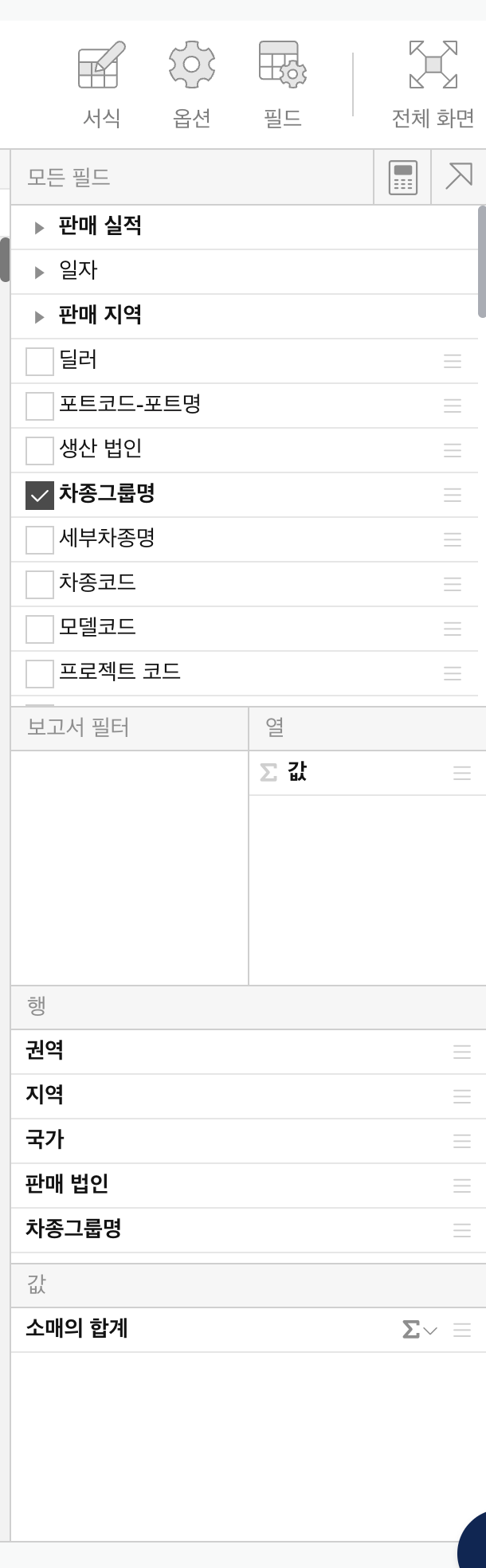
We would like to prevent users from removing certain required fields from the Rows section while still allowing them to modify other fields.
Based on what we have found so far, it appears that the built-in Field List may not provide a way to intercept or prevent this action without implementing a custom Field List. Could you please clarify the following?
Preventing removal of specific fields
Is there a supported way to lock specific fields in the Rows section so that users cannot remove them through the built-in Field List?
Detecting or canceling the action
Is there an event or callback that is triggered when a user attempts to remove a field from Rows? Ideally, we would like to intercept the action, display a warning message, and prevent the removal. If canceling the action is not supported, can we at least detect which field was removed so that we can display a warning and restore it?
Alternative approaches
Does Flexmonster offer any other supported approach to keeping certain fields mandatory in Rows without replacing the built-in Field List with a custom implementation?
Future support
If this functionality is not currently available, are there any plans to support field-level restrictions or a cancelable event for changes made through the Field List?
Our goal is to keep the built-in Field List available and interactive while ensuring that certain required row fields remain in the report.
We would appreciate any guidance or code examples you could provide.
Best regards,
 ⋅ October 21, 2026
Hello, Taehong!
Thank you for reaching out to us.
Kindly note that it is not possible to make a specific field required in Rows out of the box in the current version of Flexmonster.
Please find the detailed answers to your questions below:
1) Is there a supported way to lock specific fields in the Rows section so that users cannot remove them through the built-in Field List?
It is possible to use CSS or modify the DOM to prevent users from dragging the fields out of the Rows box.
2) Is there an event or callback that is triggered when a user attempts to remove a field from Rows? Ideally, we would like to intercept the action, display a warning message, and prevent the removal. If canceling the action is not supported, can we at least detect which field was removed so that we can display a warning and restore it?
There is no such event out of the box. However, you can detect the changes made in the Rows box with a MutationObserver or the default DOM event listener(e.g., mouseup), or by comparing the slice from getReport() before and after the reportchange event. If a required field is missing, you can display a warning and restore the previous report with setReport().
Here is an example of listening to mouseup to disable the "Apply" button in the popup Field List to illustrate the idea: https://jsfiddle.net/flexmonster/n7qg2rdu/.
3) Does Flexmonster offer any other supported approach to keeping certain fields mandatory in Rows without replacing the built-in Field List with a custom implementation?
If your use case allows the required fields to always stay at the top of the Rows area while users add other fields below them, locking the fields with CSS would suffice. We have described the suggested workaround in more detail below.
4) If this functionality is not currently available, are there any plans to support field-level restrictions or a cancelable event for changes made through the Field List?
Our team has added your request to our Customers' Wishlist. We will consider implementing the required field functionality in the next major version of the component, which is already in active development.
For now, we recommend the following workaround to achieve the desired behavior:
1) Disable drag-n-drop so the user cannot remove the field directly from the grid: https://www.flexmonster.com/doc/grid-options/#enable-or-disable-dragging
2) Update the context menu so users won't be able to remove the field from Rows by bypassing the Field List. Here is an example of how to remove the "Remove field" tab from the context menu: https://jsfiddle.net/flexmonster/gbuvksq3/.
3) Disable pointer events for the required fields using their aria-label (the field caption):
.fm-fields-view [aria-label="Country"],
.fm-fields-view [aria-label="Category"] {
  pointer-events: none !important;
}
We have prepared a JSFiddle sample showing how to restrict moving specific fields from Rows area using the right-sided FieldList: https://jsfiddle.net/flexmonster/r9uvoLdm/.
Please let us know if the suggested approach works for your case.
Looking forward to hearing from you.
Kind regards,
Solomiia
⋅ October 26, 2026
Hi Solomiia,
Thank you for the detailed explanation. The suggested workaround works well for disabling interactions with the required fields.
I have one follow-up question: Is it possible to hide these required fields entirely from the built-in Field List while keeping them in Rows and visible in the pivot table?
Ideally, users would only see and interact with optional fields in the Field List, while the required fields would remain applied to the report.
Is there a supported option or recommended workaround for this?
Best regards,
Taehong
⋅ October 26, 2026
Hello, Taehong!
Thank you for getting back to us.
We are happy that the suggested workaround works well for you.
Kindly note that you can adjust CSS to hide the fields from "All fields" list entirely, while keeping them pre-selected in the Rows box.
We have updated the example: https://jsfiddle.net/flexmonster/7sLrhfqy/.
Hope you will find our answer helpful.
Kind regards,
Solomiia

