 asked on March 19, 2026
How to highlight the row if its "isOthers" field is set to 1.
My data is as follows:
[{country_group: Europe, country: Netherlands, isOthers: 0, ...}, {country_group: Europe, country: UK, isOthers: 0, ...}, {country_group: Europe, country: Others, isOthers: 1, ...}, {country_group: China, country: '', isOthers: 0, ...}, {country_group: US, country: '', isOthers: 0, ...}, {country_group: Taiwan, country: '', isOthers: 1, ...}, {country_group: Indonesia, country: '', isOthers: 1, ...}]
If isOthers is 1, i need to highlight the whole row as shown (this is my requirement):
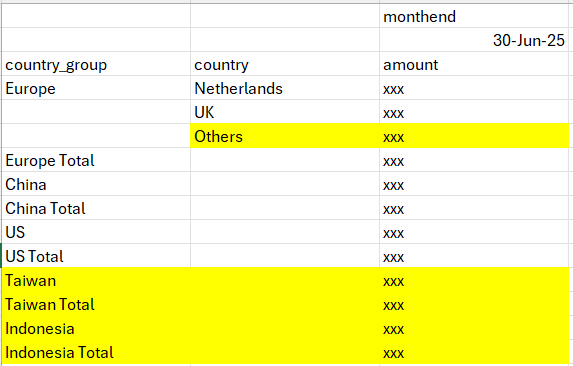
To achieve this, initially I tried to attach a property to a dimension, then check if the property exists in the rows:
mapping['isOthers'] = {type: 'property', hierarchy: 'country_group'}
in the customizeCell method, i do this
const isOthers = data.rows.some((row: any) => row.properties?.isOthers);
if (isOthers) {
cell.addClass('highlight-others')
}
this one works for the group level rows, but for "Others" rows under subgroup, all rows are highlighted as shown which is wrong:
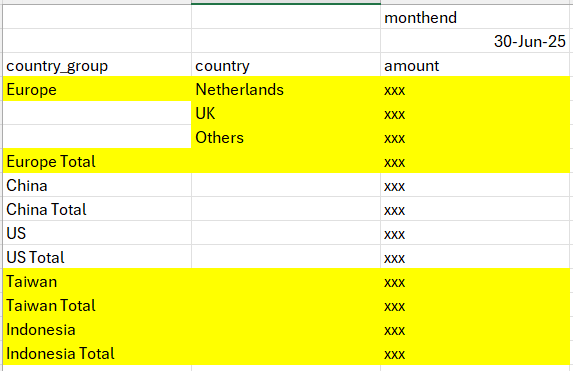
I cannot find a distinction between 'Europe' row, 'Europe Total' with, for example 'Taiwan' and 'Taiwan Total'.
So I tried a different approach. Instead of attaching isOthers as property, I add it as a measure and will just need to hide it using tableSizes (hiding is not an issue). I used 'min' for aggregation so that only those rows whose isOthers=1 will be highlighted. But in customizeCell, I am not able to see the measure 'isOthers'.
measures.push(
{
uniqueName: 'isOthers',
aggregation: 'min',
active: true
}
)
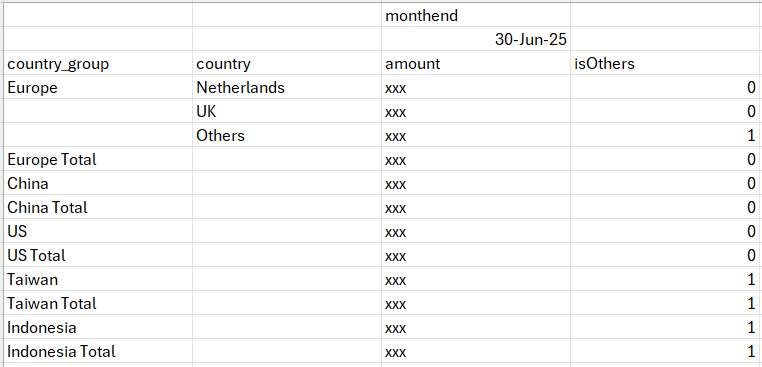
How to proceed from here?
 ⋅ March 19, 2026
Hello, Raymond!
Thank you for reaching out to us and for the detailed description of your use case.
We would like to suggest proceeding with the property approach.
If we understand the use case correctly, there are two scenarios: one where the country field includes an explicit “Others” member, and another where country_group implicitly contains an “Others” category. In both scenarios, highlighting should be applied from the nested level of the "Others" member, ignoring the parent subtotal row.
For that, we suggest splitting the isOthers property into two in the dataset, for the country and country_group fields, to distinguish which cells to highlight.
The sample data would look as follows:
    [{ country_group: 'Europe', country: 'UK', isOthers: 0, amount: 100 },
    { country_group: 'Europe', country: 'Others', isOthers: 1, amount: 100 },
    { country_group: 'Taiwan', hasOthers: 1, amount: 100 },
    { country_group: 'Indonesia', hasOthers: 1, amount: 100 }...]
We have prepared a JSFiddle example to illustrate the idea: https://jsfiddle.net/flexmonster/np3eo9d1/.
Please let us know if the suggested approach would work for your case.
Looking forward to hearing from you.
Kind regards,
Solomiia
⋅ March 20, 2026
Hi Solomiia,
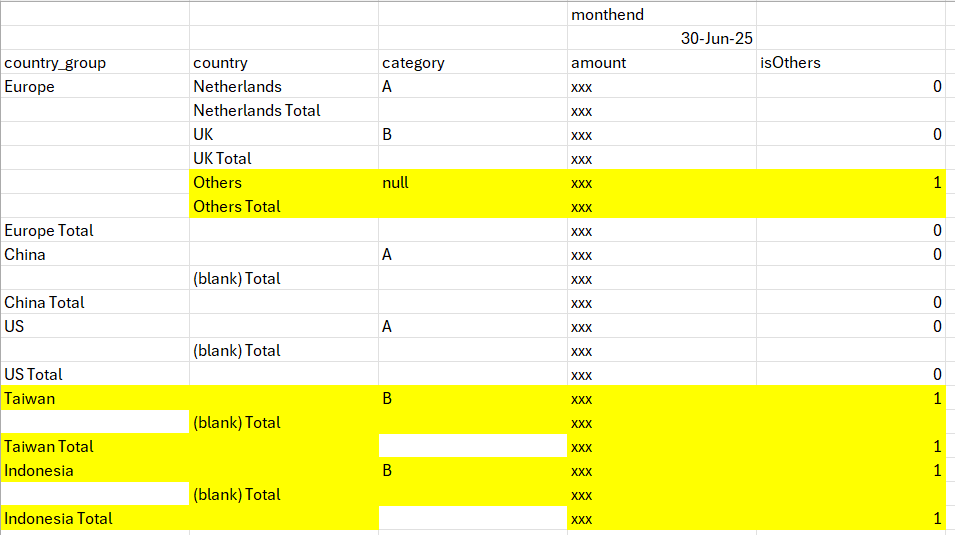
I tried your suggestion and it works. Thank you. However, when I added another field from the pivot table, some cells are not highlighted as shown:
⋅ March 20, 2026
Hello, Raymond!
Thank you for your swift response.
We are happy to hear that the suggested approach with two separate properties works well for you.
Regarding your question about some empty cells not being highlighted, kindly note that we exclude cells with no data from being iterated in customizeCell().
Our Dev team will take a closer look at the case and research if it's possible to include empty header cells in customizeCell() function. We will get back to you with the research update on ETA April 13th.
Feel free to ask if there are any further questions.
Kind regards,
Solomiia
⋅ April 14, 2026
Hello, Raymond!
Hope you are doing well.
We are happy to let you know that the issue with empty tuples in the classic view was fixed.
Here is the updated JSFiddle example to illustrate the customizeCell behavior after the fix: https://jsfiddle.net/flexmonster/y2jmgwsf/.
The fix is included in the 2.9.127 version of Flexmonster:https://www.flexmonster.com/release-notes/version-2-9-127/.
You are welcome to update the component: https://www.flexmonster.com/doc/updating-to-the-latest-version/.
Please let us know if the fix works well for you.
Kind regards,
Solomiia
⋅ April 29, 2026
Hello, Raymond!
Hope everything is well.
Just checking in to ask if the fix for empty tuples in the classic view was helpful. Here is the updated JSFiddle example to illustrate the customizeCell behavior after the fix: https://jsfiddle.net/flexmonster/y2jmgwsf/.
Looking forward to hearing your feedback.
Kind regards,
Solomiia

